Thursday, 4 October 2012

What Is Physical Access?


Physical access security prevents people from coming into direct contact with computer systems and components. It is an important security concern, as all the technical access controls in the world cannot eliminate some problems, like someone walking into an office and taking a hard drive, for example. There are a number of measures security professionals can use to limit physical access and keep systems safe. These can include the use of locks, biometric identification, and security guards in facilities with sensitive equipment.

If someone can gain physical access to a location with secure computer components, that person may be able to crack the security and obtain information. Sometimes this can be as simple as checking a desk drawer for a password someone may have written down. The hacker could also install keystroke loggers and use various cracking attempts on the computer system to get to the data. If these measures fail, hackers can simply take the computer itself and work on it in another location.

One basic measure of physical access is a locking door, with access limited to authorized personnel only. Server rooms and similar facilities can be kept locked at all times to secure them. People may be able to enter with a key or a card. Some facilities use biometrics to make sure that people don’t gain access by stealing cards or faking the credentials used to open a lock. This simple access control can be highly effective in some facilities.


Cameras may be used to monitor sensitive areas where physical access is a concern. Guards can watch for signs of suspicious activity remotely, and the cameras can also be reviewed after a break in to collect information. Additionally, facilities can post guards near a room with sensitive computer equipment, or around the building in general, to make it impossible for anyone without the right credentials to enter. Other external security measures can include fencing, alarms on windows, and guard dogs, depending on the facility and its needs.

It is possible for physical access and computer security to interface. Many access control systems use a network to communicate information, as seen with biometrics and electronics credentials. These systems themselves can be vulnerable to hacking as well as need to be appropriately secured. Human guards are not infallible for a different reason; they might be bribed, blackmailed, or overpowered by someone who wants to enter a facility. Layers of security can reduce the risk of a breach by creating automatic fail-safes.

What Is a Keyboard Circuit Board?


A keyboard circuit board is a sheet or panel in a computer keyboard that is designed to sense when a key is pressed, determine what key was pressed, and send the information to a computer or other devices to which the keyboard is attached. There are two main parts that comprise a keyboard circuit board, with the largest and most prominent section being the area under the physical keys that can be pressed. Although there are different mechanisms that can be used, this area generally uses a pattern of circuits that are either completed or broken when a key is depressed, telling the keyboard controller the location of the pressed key. Also on the keyboard circuit board is a microprocessor known as a keyboard controller, some read-only memory (ROM) that is used to store information about what key locations equate to what characters, and some type of hardware interface for sending the key data to another device, such as a universal serial bus (USB) or serial port connector. The actual material from which a keyboard circuit board is made can be metal, epoxy or thin sheets of plastic on which the necessary circuits are printed.


There are two primary methods that can be used on a keyboard circuit board to capture key presses. The first method involves placing a small conductive plate on the bottom of the physical keys. On the circuit board beneath the keys, there is a pattern of incomplete circuit pathways. When a key is depressed, it completes the circuit on the board, sending a signal to the controller informing it of the location of the key that was pressed. The controller then can use a table stored in the keyboard’s ROM to determine what character is at that location.

A second method that also is frequently found in keyboards involves a keyboard circuit board that is covered in a pattern of active, completed circuits. Sometimes called a capacitive keyboard, an electrical signal is constantly running through this type of keyboard circuit board. On the bottom of each key is a small plate that, when the key is pressed, gets close enough to the array of circuits that it changes the charge passing through the circuit underneath. This change in current is detected by the keyboard controller to determine which key was pressed.

The material from which a keyboard circuit board is actually made can vary. Older models can be made from metal, while other types can be made from layers of thin sheets of plastic with circuits printed on their surface; these often are called printed circuits. In addition to the area of the circuit board that is used to detect key presses, the board also usually contains a microchip — known as the keyboard controller — that functions as a very basic processor and usually contains some ROM and a digital comparator for basic computations. A circuit board also has some type of output interface attached, such as a serial connector or wireless transmitter, so the information can be relayed to the device with which it is being used.

What is a Keylogger?


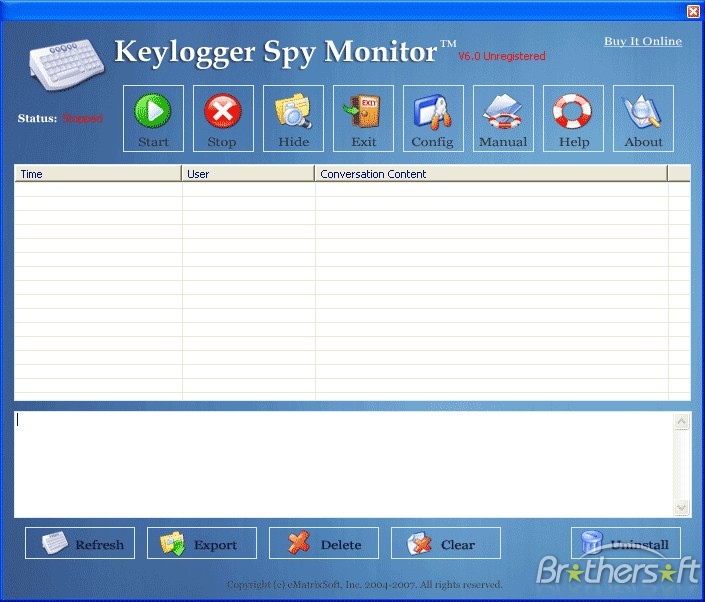
A keylogger builds a log of everything typed into a keyboard to be reviewed by a third party. Keyloggers can be used for legitimate purposes to troubleshoot networks, analyze employee productivity, or to assist law enforcement, for example; or they can be used for illegitimate purposes to surreptitiously spy on people for personal gain. A keylogger can be a hardware device or a software program.

The most common hardware keylogger plugs into the computer’s keyboard port, connecting to the keyboard cable. It can look like an extension tail or in other cases a small cylindrical device. This makes it easy to spot, if looked for, but it won’t be detectable by software. Models are priced around the number of keystrokes they can hold, with higher capacities being more expensive. One entry model costs $49 US Dollars (USD) with a capacity of 128,000 keystrokes.

Once installed, the log is retrievable through opening a word processor and entering a password to reveal a hidden keylogger menu. Like all hardware keyloggers, it has the limitation of requiring physical access to the system, but might be used by network administrators or by parents to monitor the family computer.

Another type of hardware keylogger is preinstalled inside the keyboard itself on the circuit board. This device is undetectable barring disassembly of the keyboard, but does require replacing the existing keyboard. A similar keylogging product can be soldered on to the circuit board of any keyboard, but this requires some skill.


Software keyloggers are often installed through malware like Trojans, viruses, spyware or rootkits. These keyloggers can collect keystrokes through a number of methods, depending on design. Some keyloggers work at the kernel level; others use a hook to hijack system processes that manipulate the keylogger; and still others use entirely different means. A keylogger that is installed remotely through malicious means secretly sends its logs to the person who planted the device via an Internet connection.

The danger of a malicious keylogger is that it traps information before it can be encrypted. For example, banking websites provide a secure connection between your computer and the website so that all data is encrypted in transit. However, as you type a username and password, the keylogger is recording those keystrokes, bypassing any and all security measures. Keyloggers not only have the ability to trap usernames and passwords, but credit card numbers, bank account numbers, private passphrases for encrypted files, financial records, email and so on.

Keyloggers are widely available online but are also easy to write, making them a real threat to personal security and an easy tool for the growing problem of identity theft. At this time there is no sure-fire way to protect yourself against all forms of keyloggers, but there are steps you can take to minimize risk.

Install top-notch anti-virus and anti-spyware on your system, preferably programs that help to prevent keyloggers and watch for keylogging activities. This doesn’t guarantee you won’t get a keylogger, but it helps by recognizing and removing known keylogger signatures.

Regularly check the processes running on your system looking for anything that doesn’t belong. In Windows® systems you can use Task Manager to view running processes. Third party applications are also available that will not only show you which processes are running, but will provide a direct link to information online regarding the nature of the process. If you are unfamiliar with running processes, this is a good place to start to familiarize yourself with what you should expect to see in your system, and what you shouldn’t.

A firewall commonly does not provide keylogger protection but can alert you if a program is trying to send information out to the Internet. By stopping this action you can prevent a thief from retrieving a log, and be alerted to the possible presence of a keylogger.

Other methods to ‘confuse’ a keylogger include typing extra letters or numbers when entering secure information, then highlighting the characters that don’t belong and entering a legitimate character to replace them. You can also use a browser with a form-filler function that will keep usernames and passwords securely on your system, and fill them in automatically when you enter a site, without forcing you to use the mouse or keyboard. Additionally, there are programs that scan for keyloggers, but they can detect legitimate processes as well, making it difficult for the average person to make real use of these tools.